Dec 22, 2010 | 4 Min Read
Update Your E-commerce Catalog and Product View: A Step-by-Step Guide
Updated Catalog View & Product View | Web Shop Manager
The Best eCommerce Catalog & Product Pages
Web Shop Manager™ (WSM) has released version 3.3.3 with some exciting changes to the Catalog and Product page views. You may have already noticed some subtle differences around your eCommerce website. The recent enhancements include:
Enhanced Catalog Layout
A new option has been added to the System>Configuration>Catalog tab. When “Enhanced Catalog Layout” is enabled, additional information regarding Categories and Products will be displayed. This additional information may include product descriptions, product availability, product condition and an “Add to Cart” button for each product listed. Here is an example of Enhanced Catalog Layout being enabled:
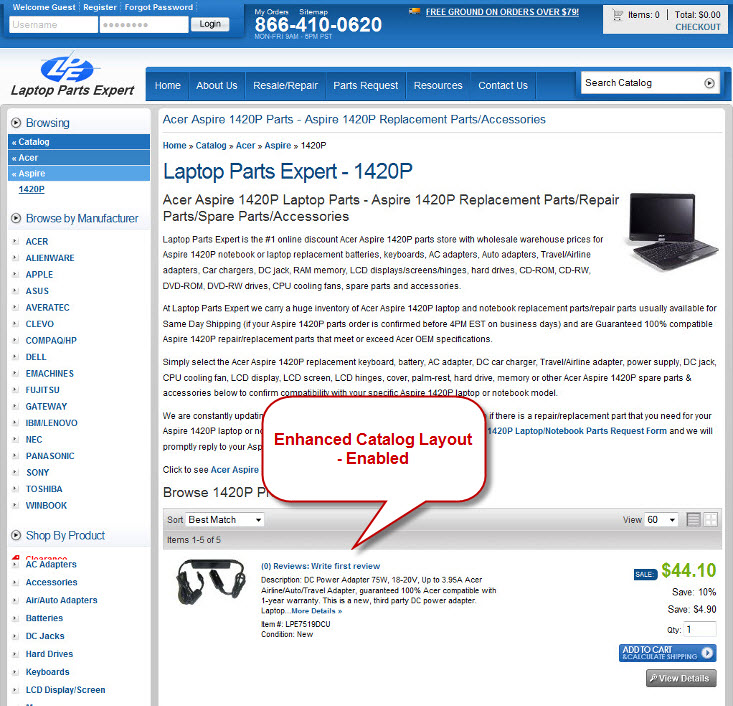
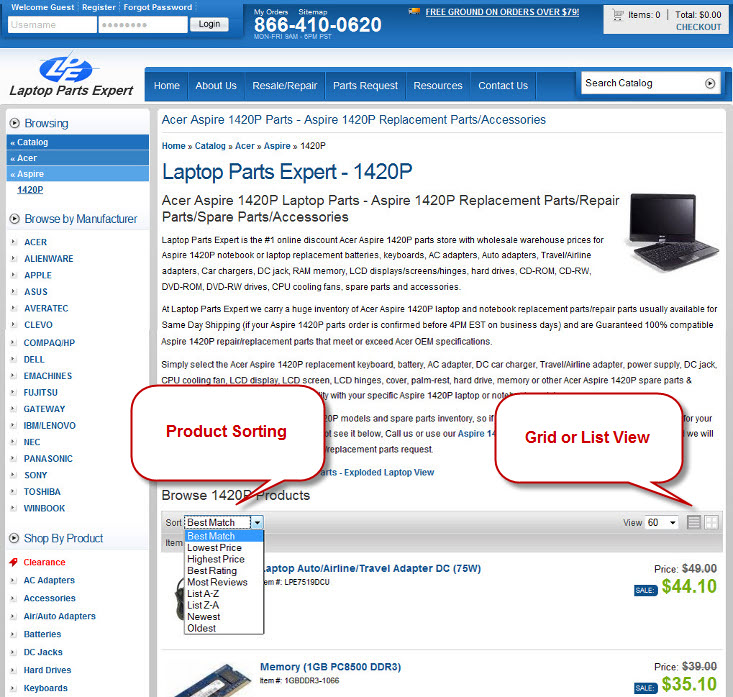
On Category and Brand pages where products are listed, you will notice that customers have the ability to sort products, and to toggle between list and grid view. These view preferences will be remembered as they continue to shop your eCommerce website. This has been implemented on all eCommerce sites and requires no further action to take advantage of this. When Enhanced Catalog Layout is disabled (default setting) only Category and Product names are displayed. Same example as above but with the default setting:
A New Look for Product Pages
You may also notice some subtle differences on Product Pages. Option Set boxes (when applicable) have a slightly new look. The remainder of the product listing including the extra details should look very familiar to you.
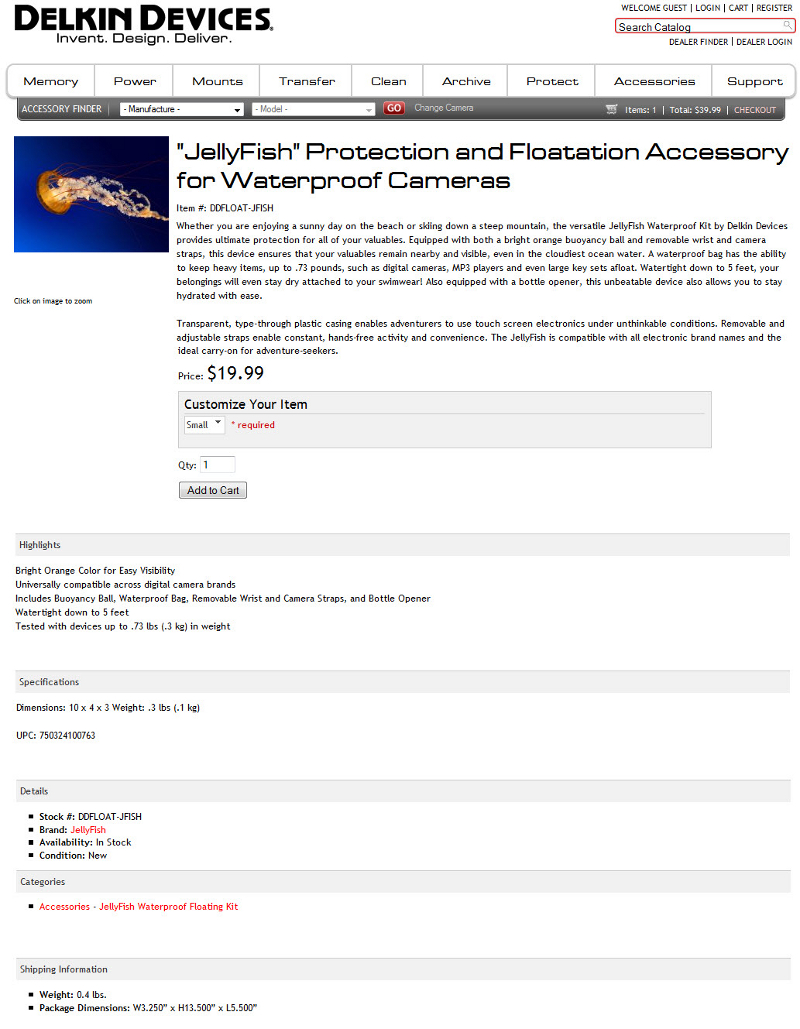
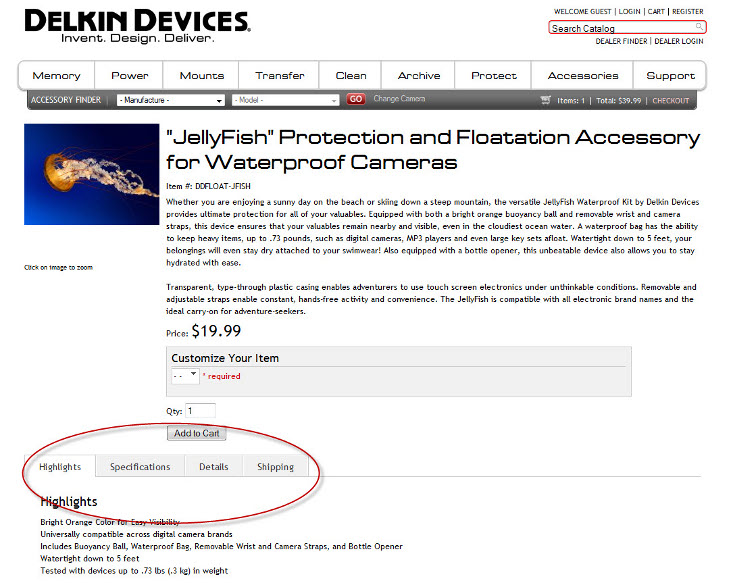
While the new look of Option Sets will affect all of our eCommerce clients, the addition of Product Page Views found on the dashboard under System>Configuration>Catalog will not. Product Page View allows you to select different display options for your product pages. “Tabbed” will format the additional information in a horizontal view; this is not the default view (see the image above for an example of the default). NOTE: This setting may conflict with your eCommerce website’s Style Sheet. A consultation with a WSM employee is recommended before use of this setting. The default view will not look any different than what you are used to. The Tabbed view however will look similar to this:
Additional Features of Web Shop Manager – v 3.3.3
Connect with external programs with Custom Order Exports chose from (4) different order exports; (1) XML, (3) CSV. Click to learn more about Dealer you can add Warehouses under the System tab and assign products to them. For products assigned to each warehouse, shipping will be calculated from the Warehouse address versus the address given in the configuration tab.
Increase or decrease the UPS and FedEx rates given to your customers by amount or percentage. This affects both negotiated and non-negotiated rates. These changes can be set under Configuration – Shipping & Handling tab.
Best eCommerce Content Management System. Period.
When our eCommerce customers give us feedback on how we can help to make their lives easier, or make them more money we listen. If you are currently a WSM customer please let us know if you have any questions or concerns regarding the recent changes and their affects on your site. And please keep the suggestions and feedback coming.
On the other hand, if you have yet to experience WSM and the incredible eCommerce features that are available right out of the box, we suggest taking a moment to contact WSM today to figure out how you can get all of your eCommerce needs (web hosting, website design, and web development) taken care of under one roof.
Get more from Web Shop Manager in Google Search:



Get in touch with us
Reach out to us for any inquiries or support, and let’s connect!


More On Related Topic
Explore our highlighted blogs for the latest insights and trends in the industry.
The Ultimate Guide to Website Logo Design Feedback
WebShopManager's Ultimate Website Logo Design FeedbackOur biggest hurdle in meeting customer expectations is understanding what it is that they like or what creatively. Part of that is customer communication and feedback on the design...
Best eCommerce Platform for SEO: Top Choices & Optimization Tips
Best SEO Friendly eCommerce PlatformOne of the main considerations to take into account when choosing your automotive Ecommerce platform is how much importance is given to SEO. Needless to say all Ecommerce platforms worth their salt...
4 Best Productivity Habits for Business Growth: An SEO Guide
4 of the Best Productivity Habits for Business GrowthAs technology has made its way into our work lives, it brings on an entirely new set of challenges when it comes to being productive.There is...

Ready To Grow Your Business?
Ready to grow your aftermarket eCommerce presence and lift conversions across auto, truck, powersports, marine, and more? Connect with
Web Shop Manager for tailored solutions: strategy, platform, and performance in one team.