SEO Definitions | Web Shop Manager
SEO Definitions: Meta Information & Keywords
When planning to do SEO (Search Engine Optimization) for your site, it is important to note that there are some basic SEO techniques to follow in order for your efforts to maximize their effects. This week, let’s start with SEO definitions of common words you will see used often in the SEO world:
What is a Keyword?
A keyword is a word or phrase that you choose to match what you believe users are searching for and are relevant to your site and its content. It is important to choose keywords for your SEO strategy that will have the most impact on searchers and are as relevant and descriptive as possible. For example, if your store sells running shoes, it is against your best interest to attempt to rank for keywords such as “shoes” or “running” and it would not make much sense to attempt to rank for keywords such as “clothes” or “sandals”. These are too vague and general, and the search volume for such keywords is often in the hundreds of thousands to millions of searches per month. Choosing the right keywords is one of the best basic SEO techniques you could implement into your SEO strategy!
But more people searching for a keyword is better for my visibility isn’t it? The short answer to this is no.
When targeting keywords, focusing only on broad, general terms is inefficient. For example, industry giants like Nike, Adidas, and Zappos will likely dominate the Search Engine Results Page (SERP) for generic searches due to their established brand authority. A better approach is to target “long-tail” keywords—longer, lower-volume, and lower-competition phrases—which account for over 70% of all searches. Crucially, the modern strategy for selecting these long-tail keywords centers on understanding user intent. Keywords are now about determining what the user is trying to accomplish (e.g., are they seeking information, looking to complete a transaction, or navigating to a specific site?). Aligning your content with this specific user intent is key to capturing valuable traffic.

A good example of a long tail keyword that is related to running shoes would be “outdoor running shoes” or “yellow outdoor running shoes”. Although less people may be searching for these keywords, they are more likely to be ready to purchase as they are searching for specific types of running shoes as opposed to the more general “shoes” search which may be to simply browse shoes.
What are Meta Tags?
Meta Tags are what can be found within the coding of your site. Also known as Meta Elements, they are HTML elements used to provide structured data about what can be found within a web page. These elements are placed as tags in the head section of an HTML document which is what a website is comprised of. This includes the Meta Title, H1 Tag, Meta Description, Meta Keywords, and Alt Tags.
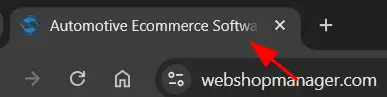
Meta Title – is the most critical on-page SEO element, as it appears at the top of the browser tab and is the first element Google uses to understand your page’s topic. While it carries significant ranking power, its primary function on the SERP (Search Engine Results Page) is to serve as compelling ad copy designed to maximize the Click-Through Rate (CTR).
Therefore, the title must be crafted not just for search engines, but to entice user clicks. Due to modern SERP display constraints, it’s essential to keep the title concise, typically within the recommended 50–60 character range, to avoid truncation (being cut off) by Google.
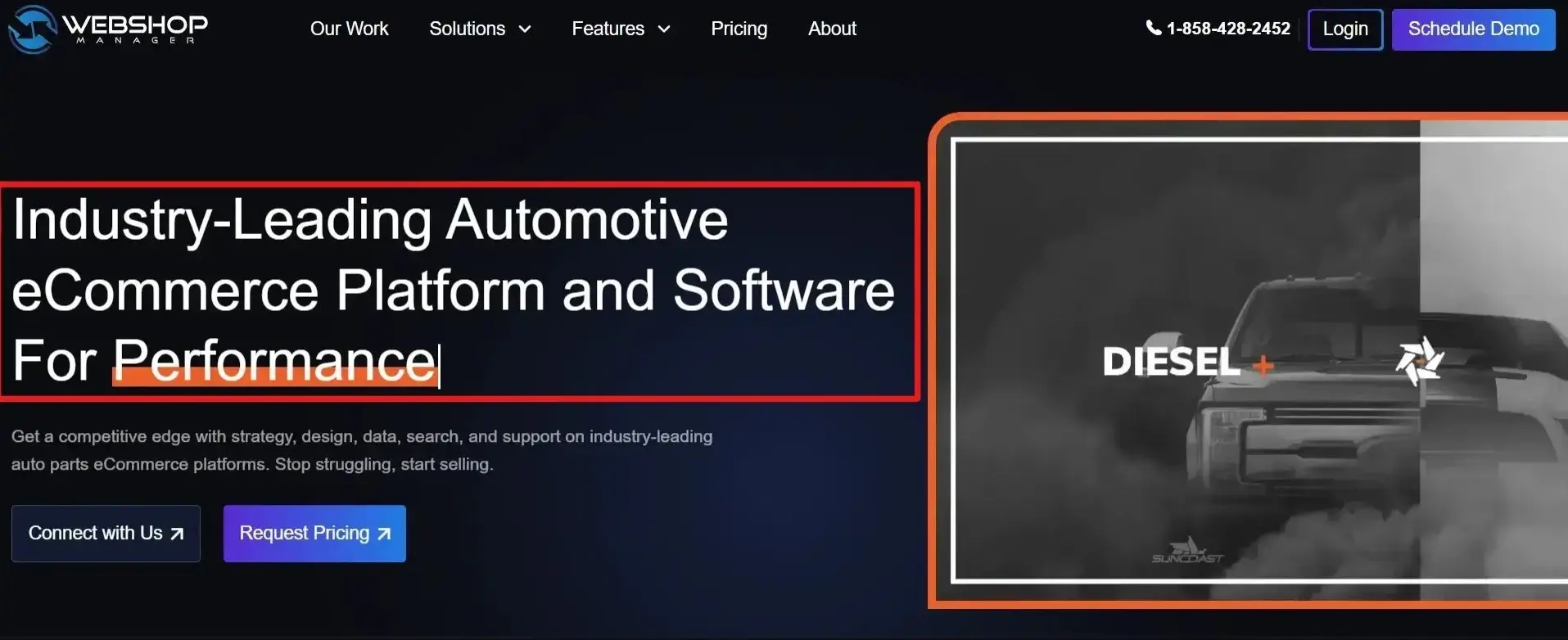
H1 Tag – serves as the main on-page heading and is the single, most descriptive title for the page’s content, clearly communicating the page’s topic to both users and search engines.
While the H1 is an important element used by search engines to understand and structure a page, the widely accepted best practice is to use only one H1 tag per page. This ensures the page has a clear, singular focus and a well-defined main heading.
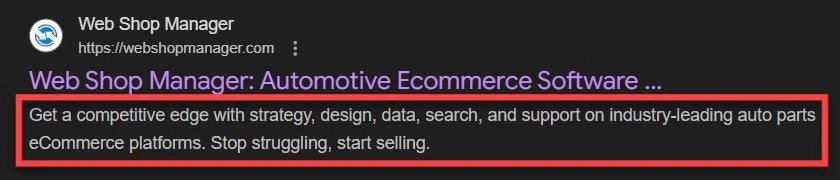
Meta Description – is the small block of descriptive text that appears beneath the Meta Title on the SERP (Search Engine Results Page). It is important to note that the Meta Description is not a direct ranking factor for search engines like Google. Despite this, it is an essential component for driving clicks.
The description should be crafted as a compelling, keyword-inclusive summary of the page’s content, effectively serving to entice the user to click through to your site, thereby maximizing your Click-Through Rate (CTR).
Meta Keywords – was historically used to list the specific keywords chosen for an individual webpage, serving as a non-visible way to describe the page’s content to search engines. However, it is crucial to understand that the Meta Keywords tag is no longer used or considered by Google (and most other major search engines) for ranking purposes and is now effectively obsolete.
While the definition provides historical context, modern SEO strategy requires that you do not rely on this tag for visibility or ranking.

Alt Tags – Used to describe to Google what an image on the page looks like. Unlike you and me, Google cannot see an image – it only sees a blank area when an image is posted on a web page. Because of this, we use the alt tag on images to utilize text to describe to Google what the image is about, allowing Google to index it and allow it to appear in search engine results for images.

Foundational Modern SEO Concepts
SEO has evolved beyond just keywords. To succeed today, you must focus on user experience, content quality, and intent. Here are the critical modern definitions you need to know.
1. E-E-A-T: Your Content’s Credibility Score
E-E-A-T is Google’s core framework for assessing the quality and trustworthiness of your content. It is especially vital for topics that impact a user’s well-being (YMYL: Your Money or Your Life).
| E-E-A-T Element |
What It Means |
Why It Matters for SEO |
| Experience |
First-hand knowledge or personal experience with the topic. |
Proves you’ve actually used the product or done the action you describe. |
| Expertise |
Having specialized knowledge or skill in the area. |
Shows the content creator is qualified to write on the subject. |
| Authoritativeness |
Being recognized as a trusted, reliable source by others in your industry. |
Demonstrated through high-quality backlinks and brand mentions. |
| Trustworthiness |
The content is accurate, honest, and safe for users. |
Requires clear contact info, security (HTTPS), and transparency. |
2. Search Intent: The ‘Why’ Behind the Search
Your content won’t rank unless it matches the reason a user searched in the first place. Search Intent is the user’s underlying goal. Aligning with intent is the single biggest factor in modern keyword targeting.
| Intent Type |
User Goal |
Example Query |
How to Target It |
| Informational |
To research a repair or learn about a product’s function. |
“How to install a cold air intake on a 2018 F-150” |
Publish detailed **install guides, comparison articles, and tech spec** content. |
| Navigational |
To reach a specific known manufacturer, retailer, or software tool. |
“Web Shop Manager platform login” or “ACDelco oil filter” |
Optimize titles and URLs for brand and model names; link internal pages clearly. |
| Commercial |
To compare products and services before a final decision. |
“best off-road suspension kits for Toyota Tacoma reviews” |
Create **Buyer’s Guides** and detailed product reviews with comparison features. |
| Transactional |
To immediately buy a specific product or sign up for a service. |
“buy EBC brake pads for 2005 Mustang GT” |
Ensure fast-loading product pages, clear fitment tools, and a prominent call-to-action (CTA). |
3. Core Web Vitals (CWV): Measuring User Experience
Core Web Vitals are a set of metrics Google uses to quantify how users perceive the speed, responsiveness, and visual stability of your site. These metrics are direct ranking factors for page experience.
-
⏱ Load Speed (LCP)
- Metric: Largest Contentful Paint.
- Measures: How fast the main content of your page loads.
-
👇 Interactivity (INP)
- Metric: Interaction to Next Paint.
- Measures: How quickly the page responds after a user clicks a button or taps a link.
-
📌 Visual Stability (CLS)
- Metric: Cumulative Layout Shift.
- Measures: How often content unexpectedly jumps or shifts while the page is loading.
4. Schema Markup: Enabling Rich Results
Schema Markup is a form of structured data (code) that you add to your HTML to give search engines explicit context about the content on the page (e.g., “This is a recipe,” or “This is a product review with 5 stars”).
- Definition: Code that organizes data to help search engines understand your content’s context and relationships more deeply.
- The Big Benefit: It enables Rich Results (visually enhanced SERP listings) that make your page stand out, leading to a higher Click-Through Rate (CTR).
- Examples of Rich Results: Star ratings, FAQ dropdowns, product pricing, and recipe cards.
To begin understanding SEO it is important to have a general knowledge on the basic elements of what SEO’s work with. The above definitions will help begin your journey into the SEO world and get a handle on what exactly happens behind the scenes of a website!
Next Week: Continue to Part 2: Learn How to Conduct Strategic Keyword Research!
Get more from Web Shop Manager in Google Search: