Automotive Product Data Automation for Parts Stores: PartsLogic Connect
PartsLogic Connect pulls catalog, pricing, inventory, fitment and images from your distributors, data providers and supplier files into one catalog, prices every part by your rules without ever going below MAP, and shows you every change before it reaches your Web Shop Manager store.
78,000 Truck Parts, 7 Places to Buy Them, Nobody Typed a Word
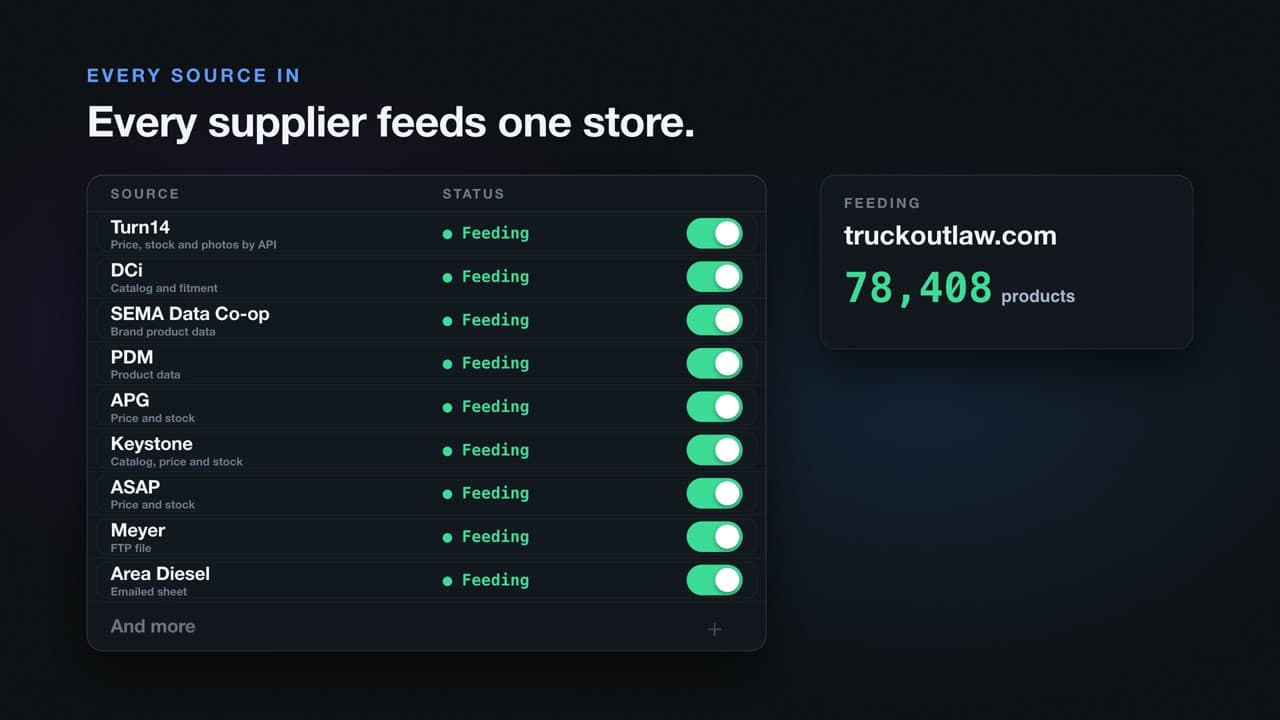
Truck Outlaw sells 78,408 truck parts on Web Shop Manager, and nobody at the store typed a word of that catalog. PartsLogic Connect builds it from the suppliers Truck Outlaw buys from, and every part goes out to seven places to buy it: the store, Meta, TikTok, Google, eBay, Amazon and email.
Most parts stores are stuck in the middle. Every supplier sends data its own way, every channel wants it another way, and somebody retypes it all. Connect takes that seat.
Four Suppliers, One Product Page
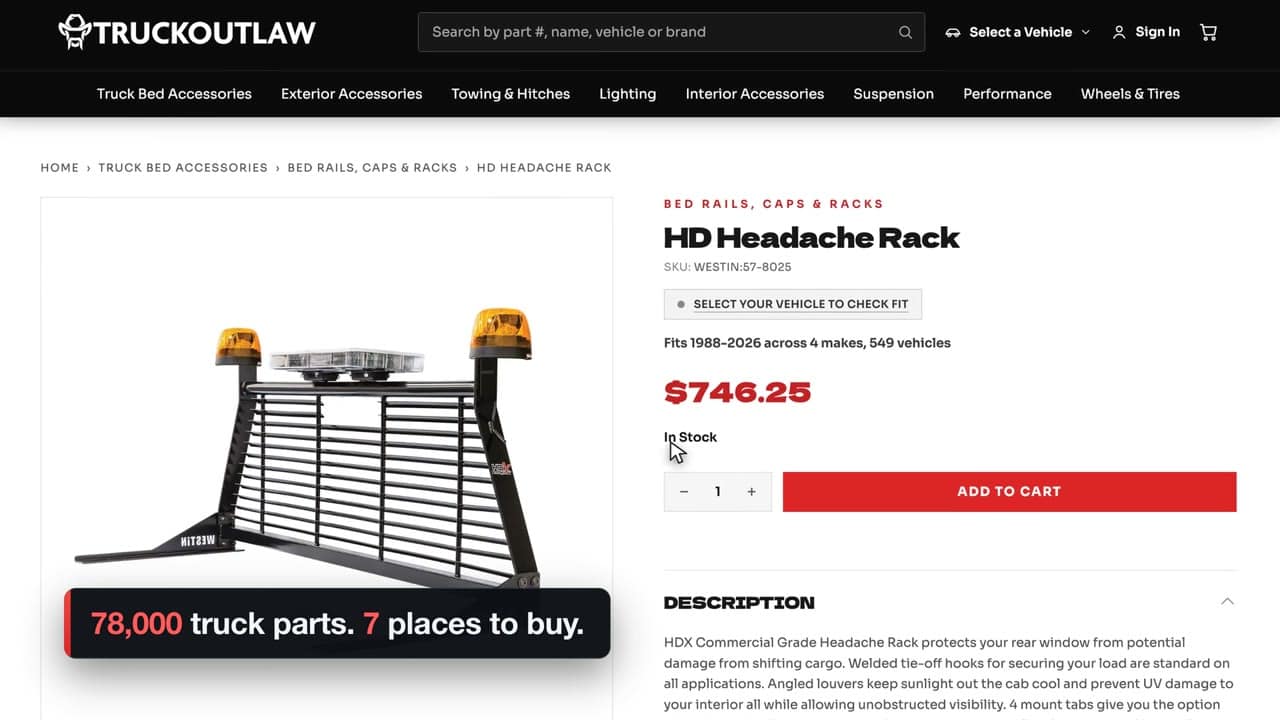
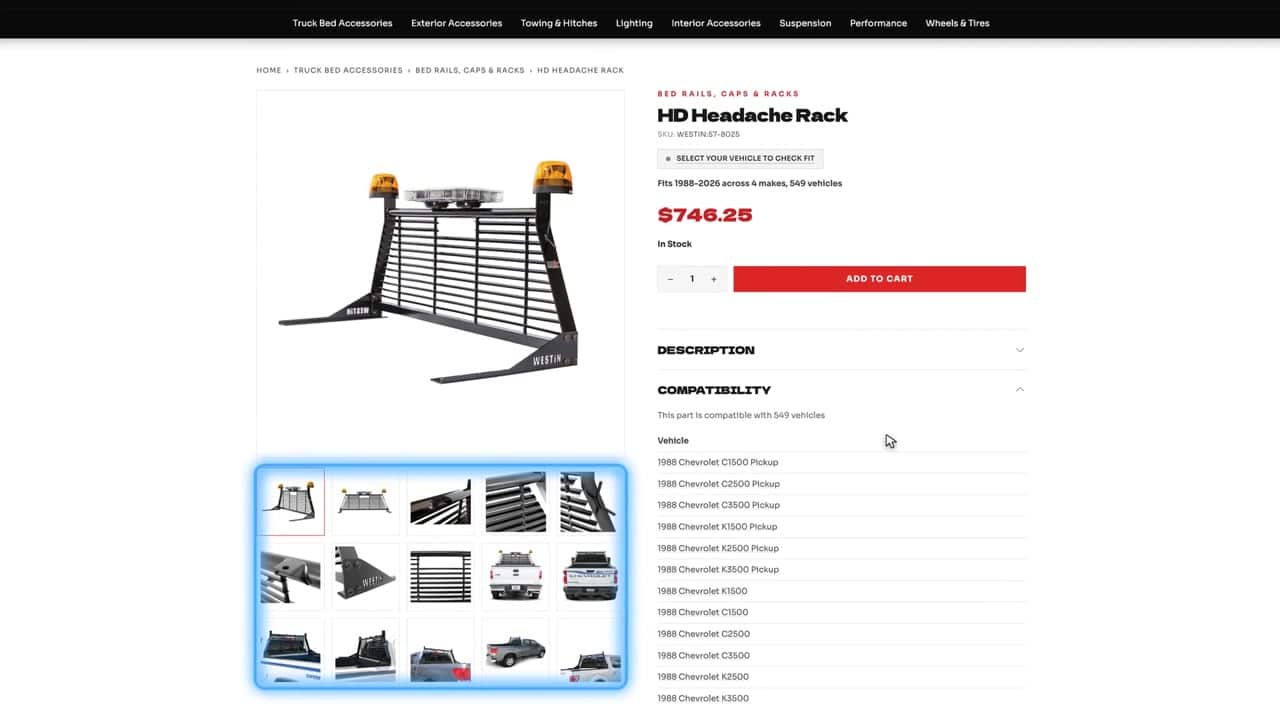
Take one headache rack. Four suppliers built the Westin HD Headache Rack page on Truck Outlaw: Turn14, Meyer, DCi CatalogRack and DCi Platinum. Connect merges what each one sends into one product.
- 15 photos pulled together from every source
- 549 vehicles it fits, 1988 to 2026, across four makes
- One price, $746.25, set by your pricing rules and never below MAP
- One title and description, no matter how many suppliers carry the part
One Product, Seven Places to Buy It
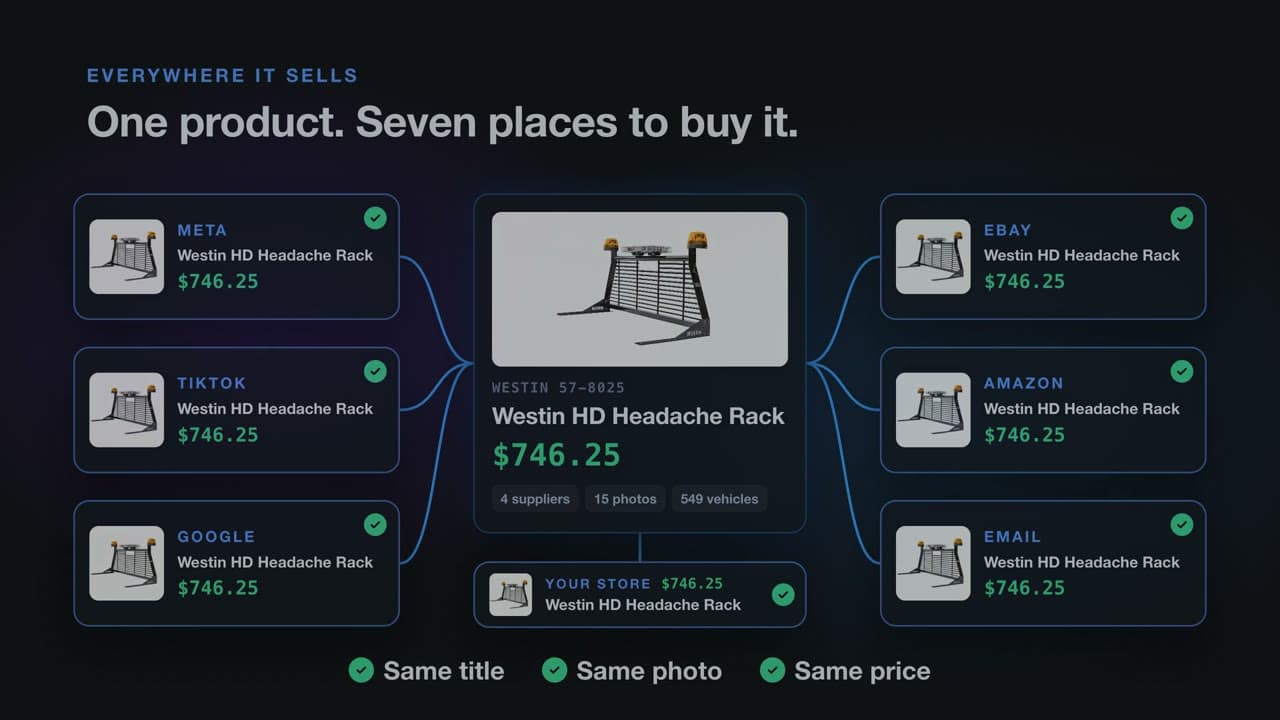
Connect sends the same product everywhere your customers shop: same title, same photo, same price, everywhere it sells. A price or stock change goes out from the same read, so the rack never sells for one price on eBay and another in your store.
- Your Web Shop Manager store
- Meta (Facebook and Instagram)
- TikTok
- eBay
- Amazon
- Klaviyo and Mailchimp email
Year, Make, Model, Search, and It Fits
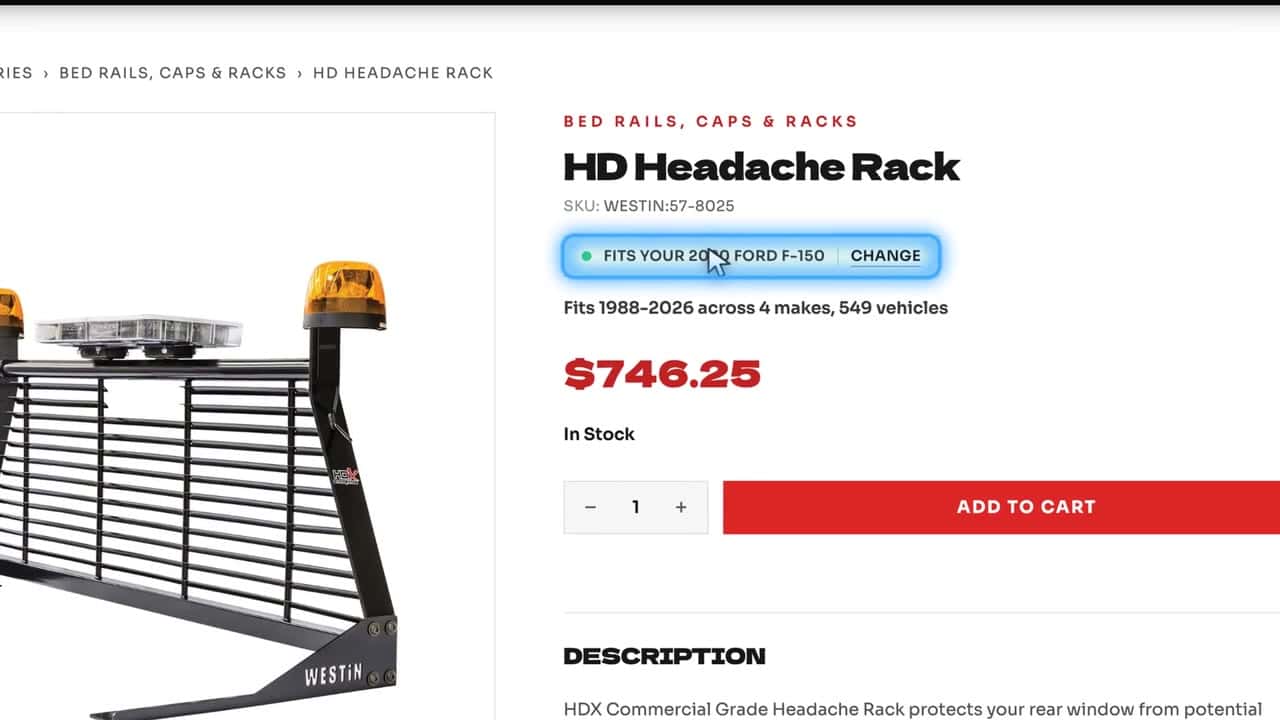
And the shopper? Pick a 2020 Ford F-150, search headache rack, and the Westin shows the green Fits your 2020 Ford F-150 line before it goes in the cart.
PartsLogic Smart Search and fitment run on the same data Connect loads: 97 years, 171 makes and 5,205 models on Truck Outlaw, so the part your supplier sent is the part your customer finds.
See it run: 200,000 parts, nobody types a price
Eurotek Tuning sells 202,215 products from 91 brands, and nobody at the store types a price. Turn 14 Distribution and PDM feed the catalog, inventory updates every 15 minutes, and one set of sources feeds both Eurotek's 5.0 store and its 6.0 store. This 79-second video shows how.
Read the video transcript
200,000 parts, 0 prices typed
Two hundred thousand parts. Ninety-one brands. Nobody at this store types a price. This is Eurotek Tuning.
Every supplier sends a different file
Most parts stores still do. One supplier has an API, one posts a file, one emails a sheet every morning, and somebody retypes it. The week it slips, you sell at last month's price.
Every source, waiting
PartsLogic Connect pulls it all in. Turn 14 and PDM feed Eurotek now, and every other source is right there, waiting. Each one added in about a minute. Even the distributor that just emails a daily inventory sheet.
Your store is safe
And your store is safe. Connect adopts the store you already have, shows every change before anything is sent, and any run can be put back.
Never below MAP
It never sets a price below MAP, and big changes wait for your release.
One feed, every store
One set of sources feeds Eurotek's 5.0 store and its 6.0 store, so moving up is seamless. It feeds any other store or channel too, or drops the files in an FTP folder every day.
Ready to sell, ready to rank
Connect writes what the feeds leave out, so every page is ready to sell, and ready to rank.
Turn it on today
Already on Web Shop Manager? Turn on PartsLogic Connect today. Have another platform, or a different use case? Let us know, and we'll have it set up in no time.
Jump to a Section
Every Supplier Sends a Different File
One distributor has an API. A data provider posts ACES and PIES files. A niche brand drops a CSV on an FTP server, and another emails an inventory sheet every morning. Somebody on your team retypes all of it into the store, and the week that slips, you sell parts at last month's cost, list parts nobody can ship, or miss the fitment that would have made the sale.
What it costs a parts store
- Prices that lag supplier cost changes, so margin leaks on every order
- Stock that reads in stock after the distributor sold out
- Fitment that never loads, so the part never shows for the customer's vehicle
- Hours a week of copy, paste and reformat that grow with every brand you add
- A catalog only one person on staff knows how to update
Connect replaces the retyping with one automated catalog, built from every source you already use.
Every Source, One Place
PartsLogic Connect reads each supplier the way that supplier sends data: an API, a flat file, an FTP or FTPS drop, an ACES and PIES file, a spreadsheet, or the sheet that lands in your inbox every morning. Pick from dozens of suppliers, switch them on, and Connect builds one catalog from all of them, brand by brand.
Sources Connect reads today
- Distributors: Turn 14 Distribution (catalog, pricing, inventory, fitment, images and orders), APG (Premier Performance), Meyer Distributing by FTP file, Keystone Automotive, ASAP Network and Area Diesel by emailed sheet
- Data providers: PDM, SEMA Data Co-op and DCi (CatalogRack and Platinum)
- And more: Motor State Distributing, MOTOR, OptiCat, WPS, Wheel Pros and others, built when you ask
- Your own data: your ACES and PIES files, your existing store catalog, and a spreadsheet stock list with cost, retail and MAP columns
- Emailed sheets: each source gets its own intake address, only allowed senders are read, and you are alerted if mail stops arriving
- Brand by brand: keep, pause or exclude any brand on any account, and nothing is fetched until you say so
Connect is the product behind supplier and WD feed management.
Your Store Is Safe
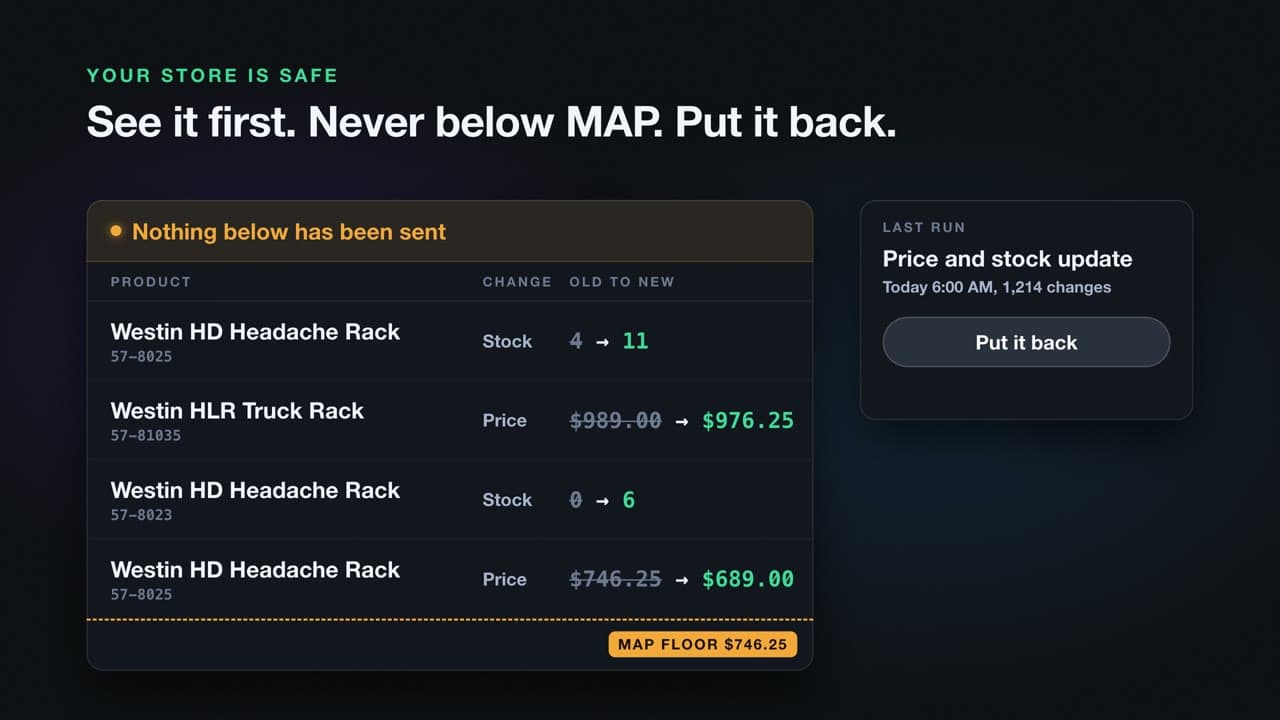
Connect adopts the store you already have. Before it changes anything, it reads your live catalog and shows you what turning it on would change: matched products, price changes, new products by brand, and what it will never write. Every scheduled update can run as a preview first, and large updates wait for your release.
What protects your catalog
- Preview any run: the real update runs with every write held, product by product, so you see it before your customers do
- Release brake: held runs go out only when you release them, or get discarded
- Put any update back: every update is journaled, and one confirmation reverses it after Connect checks it against the live store
- Bad feed days are refused: a supplier file that would zero out more than half your in-stock parts is refused, and a brand that suddenly comes back short is held instead of emptied from your store
- No automated deletes: removing categories, attributes, pictures or option sets needs a one-time approval from a person
Never Below MAP
Pricing rules set your margin by source, brand, category or part number, from cost, MAP, MSRP, retail or a fixed price, with percent or dollar markups and .99 or .95 rounding. Every rule stops at the highest MAP any supplier states, so Connect never sets a price below MAP.
How Connect prices your catalog
- MAP floor on every rule: no price is ever set under MAP, and a sweep raises any under-floor listing to exactly the floor
- Review gate: a price change above the percentage you choose waits for your approval, and one decision covers both storefronts
- Fresh prices only: a stale supplier price never wins; age limits are set per source
- One price owner: when several suppliers carry a part, your commerce policy decides who prices and fulfills it
- Plain explanations: each held price says why, such as "below your cost" or "no MAP, no markup"
One Set of Sources, Every Store
Connect reads your sources once and feeds your Web Shop Manager 5.0 store and your 6.0 store from that same read. Eurotek Tuning runs exactly this today. Moving from 5.0 to 6.0 does not mean rebuilding your feeds, and the pricing rules, brand choices and review decisions carry across both stores.
What one read gives you
- Price and availability for 5.0, written field by field
- Catalog, pricing, fitment and weights for 6.0
- A rehearsal store, fed from the same sources, for testing before launch
- One price approval that covers both storefronts
- A pause switch per store and per lane, with who, why and when on record
Ready to Sell, Ready to Rank
Supplier feeds leave gaps: thin titles, missing part types, five spellings of the same filter value, missing images. Connect writes what the feeds leave out, so each product page is ready to sell and ready to rank.
What Connect writes into your catalog
- SEO titles and meta descriptions from templates per storefront, previewed on real products before they go live
- Part types matched to the Auto Care PCdb, so products land in the right categories
- Clean attributes: one spelling per filter value, and a report of missing values
- Images uploaded per source, with duplicates found and removed on your approval
- Quality grades from A to F for every product, so you see what each source is missing
- Fitment loaded to the storefront so parts show for the right vehicles in PartsLogic Smart Search
Connect also writes the output of AI catalog enrichment into the catalog.
How PartsLogic Connect Compares
Most parts stores load data one of five other ways. Here is how they stack up against Connect.
| Capability | PartsLogic Connect | Spreadsheets and manual entry | Distributor-supplied feed or plugin | Generic feed or PIM tool | Marketplace listing tool | Custom development |
|---|---|---|---|---|---|---|
| Multiple distributors and data providers in one catalog | Built | No, retyped by hand | No, one supplier only | Partial, the mapping is yours | Partial, per connector | Yes, you build each one |
| ACES and PIES fitment loaded and normalized | Built | No | Partial, that supplier only | Partial, needs an add-on | Partial, for listings only | Yes, at cost |
| Emailed sheet or supplier FTP file as a source | Built | Yes, by hand | No | Partial | No | Yes |
| Inventory every 15 minutes, plus a daily full read | Built | No | Partial, on their schedule | Partial | Partial | Yes |
| Never a price below MAP | Built | No | Partial, MAP shown, not enforced | Partial, a rule you write | No | Yes |
| Big price changes held for your review | Built | Not applicable | No | Partial | No | Yes |
| Preview every change before it is sent | Built | Not applicable | No | Partial | No | Rare |
| Put any update back | Built | No | No | No | No | Rare |
| Bad feed day refused, store never empties | Built | No | No | No | No | Rare |
| Keep or exclude each brand, per account | Built | Yes, by hand | Partial | Yes | Partial | Yes |
| SEO titles, part types and attributes written in | Built | Yes, by hand | No | Partial, templates | No | Yes |
| Images uploaded and deduplicated | Built | No | Partial | Partial | Partial | Yes |
| One set of sources feeds 5.0 and 6.0 stores | Built | No | No | Partial | Partial | Yes |
| Orders routed to the fulfilling distributor | Built | No | Partial, their portal | No | Yes | Yes |
| Live shipping quotes at checkout | Coming Soon | No | Partial | No | Partial | Yes |
| Order management: exceptions, split shipments, rerouting | Coming Soon | No | No | No | Partial | Yes |
| Sell on eBay, Amazon, Meta, TikTok and Google | Built | No | No | Partial | Yes | Yes |
Doing this today usually takes a distributor app, a fitment search app, a dropship router and a feed manager, about $700 a month before anyone fixes a single fitment record. PartsLogic Connect does it all, starting at $500 a month.
Data Standards and Sources
Connect speaks the aftermarket's own data standards, so fitment and product content arrive the way the industry publishes them.
Built in
- ACES and PIES: vehicle fitment and product content in the Auto Care Association standards (ACES and PIES on Web Shop Manager)
- SEMA Data Co-op: ACES and PIES files with sub-brands (SEMA Data partner page)
- DCi: CatalogRack and Platinum flat files with fitment qualifiers and footnotes (DCi partner page)
- PDM: manufacturer content and ACES fitment straight from the brand's PIM (PDM partner page)
- Distributors: Turn 14 Distribution, APG (Premier Performance), Meyer Distributing, Keystone Automotive, ASAP Network and Area Diesel
On request
- Next distributor: Motor State Distributing
- Data sources: MOTOR, OptiCat, Epicor, TecDoc and DataOne
- Distributors: WPS, American Tire Distributors, Wheel Pros, Parts Authority, Parts Unlimited, Automatic, Motovicity, U.S. AutoForce and TireHub
Don't see your distributor or data provider? Tell us who sends your data and we will scope the connection.
For managing a large catalog end to end, see catalog management at scale.
PartsLogic Connect FAQs
What is PartsLogic Connect?
PartsLogic Connect is Web Shop Manager's automotive product data automation product. It pulls catalog, pricing, inventory, fitment and images from your distributors, data providers and supplier files into one catalog, prices it by your rules without going below MAP, and feeds your Web Shop Manager stores. Eurotek Tuning runs 202,215 products from 91 brands through it, with no prices typed by hand.
Which distributors and data sources does Connect work with?
Today Connect reads Turn 14 Distribution, Premier Performance (APG), Meyer Distributing, Keystone Automotive, PDM, SEMA Data Co-op, DCi, ASAP Network, your own ACES and PIES files, spreadsheets, and inventory sheets sent by email. Other distributors and data sources, such as WPS, Wheel Pros, MOTOR and TecDoc, are built on request. See ACES and PIES on Web Shop Manager.
Can Connect set a price below MAP?
No. Every pricing rule stops at the highest MAP any supplier states, and a floor sweep raises any listing found under MAP to exactly the floor. Price changes above the percentage you choose wait for your approval before they reach the store.
What happens when a supplier sends a bad file?
Connect refuses it. A file that would zero out more than half of your in-stock parts is refused and the last good file stands. A brand that suddenly comes back much smaller than usual is held for your review instead of being removed from your store, and every refusal shows up in your alerts.
Can I undo an update?
Yes. Every update Connect sends is recorded product by product, with each value before and after. You can put any update back: Connect checks the reversal against the live store, then applies it when you confirm. You can also preview any update with every write held before it runs.
Does Connect feed both Web Shop Manager 5.0 and 6.0 stores?
Yes. Connect reads your sources once and feeds your 5.0 store and your 6.0 store from the same read, with the same pricing rules and brand choices. Eurotek Tuning runs both today, so moving up to 6.0 does not mean rebuilding your feeds.
Where can Connect sell my parts?
In your Web Shop Manager store, the Meta catalog for Facebook and Instagram, the TikTok catalog, Google, eBay, Amazon, and Klaviyo and Mailchimp email. Every channel gets the same title, photo and price from the same read, and no price goes below MAP.
Does Connect handle orders and drop-ship?
On 6.0 stores, Connect can route an order to Turn 14 Distribution as a purchase order and write the tracking number back to the order. Live shipping quotes at checkout and full order management (exceptions, split shipments and rerouting) are coming soon.
I'm on another platform. Can I use Connect?
Connect writes to Web Shop Manager 5.0 and 6.0 stores today, and can export ACES and PIES into a brand's PDM account. If you run another platform or have a different use case, tell us about it and we will set it up with you.
See every feature: full walkthrough (5:25)
Watch PartsLogic Connect run Eurotek Tuning's store end to end, every feature in one sitting.
Turn On PartsLogic Connect
Already on Web Shop Manager?
Turn it on today. Tell us which suppliers you buy from, and your catalog starts filling itself.
Starting at $500 a month for PartsLogic Connect.
Turn It On TodayAnother platform, or a different use case?
Let us know, and we'll have it set up in no time.
Let Us Know