VIN Lookup for Auto Parts eCommerce: How VIN Decoding Finds Compatible Parts

VIN lookup lets a shopper paste a 17-character VIN into your store. The store decodes it into a vehicle and narrows the catalog to the parts that fit. Web Shop Manager stores support it through PartsLogic, the search and fitment product Web Shop Manager builds, decoding against the public NHTSA database and matching the result against the ACES fitment data attached to your products.

Try it: decode a VIN

This form calls the same public decode endpoint a Web Shop Manager storefront calls. Paste a 17-character VIN and see the vehicle it resolves to.


No VIN handy?

Decodes against the public NHTSA database, the same source Web Shop Manager stores use. Nothing typed here is stored, saved to your browser, or tracked.

Does Web Shop Manager Support VIN Lookup? Yes.

Short answer, for anyone comparing platforms: VIN lookup is live on Web Shop Manager stores. A shopper pastes a VIN, the store decodes it against the federal NHTSA vPIC database, shows the vehicle back to them, and applies year, make, and model as fitment context across search, category browsing, and product pages. License plate lookup is a second entry point in the same panel, and the decoded vehicle is saved to a garage in the browser that holds more than one vehicle, so the shopper does not re-enter it as they move around the site.

What this page is not: a consumer VIN decoding service. It is written for people who run or are shopping for an aftermarket parts store. If you only want to decode your own VIN, the NHTSA vPIC decoder is free and public, and it is the same data source most parts stores decode against.

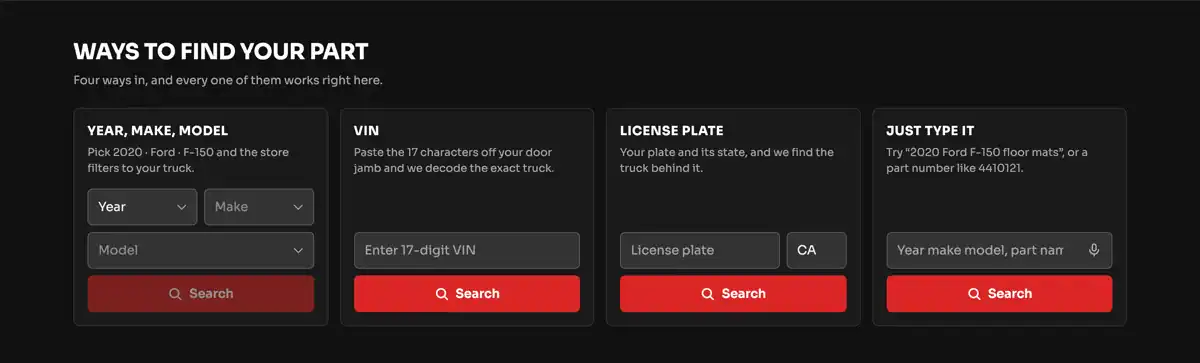
Four vehicle entry methods in the live PartsLogic demo environment: Year Make Model dropdowns, VIN entry, license plate and state lookup, and free text search
VIN entry sitting alongside Year-Make-Model, license plate, and free text in the live PartsLogic demo environment.

Jump to a Section

What VIN Decoding Gives a Parts Store

The fields a VIN actually returns, and which of them a fitment catalog can use.

How VIN Lookup Works on a WSM Store

The four-step buyer flow, and where the VIN entry point appears in the storefront.

From VIN to ACES Fitment

How a decoded vehicle is matched against the ACES applications on your products.

License Plate Lookup

The second entry point, for shoppers who cannot find the VIN.

Where VIN Decoding Stops

The honest limits: blank trim fields, cab and bed configuration, and modified vehicles.

VIN Lookup on a Live Store

A working example you can try yourself, with a real 2020 Ford F-150 VIN.

How VIN Lookup Gets Onto a Platform

The three patterns platforms use, and the three questions to ask any vendor.

Who VIN Lookup Is For

Which catalogs get real value from VIN entry, and which do not need it.

Readiness Checklist

What to have in place before you turn VIN entry on.

FAQs

Support, accuracy, plates, ACES requirements, mobile, and adding it to an existing store.

What VIN Decoding Gives a Parts Store

A VIN is the 17-character serial number carried by road vehicles sold in the United States from the 1981 model year forward. Positions 1 through 8 describe the vehicle: manufacturer, body style, engine family, and so on. Position 9 is a check digit that validates the other sixteen. Position 10 is the model year, position 11 is the assembly plant, and positions 12 through 17 are the sequential production number. Decoding turns that string back into vehicle attributes.

What the federal decoder returns

Here is a real decode from the public NHTSA vPIC database, using the sample VIN 1FTFW1E4XLFA10000:

Those last two lines are where VIN claims usually get overstated. Year, make, and model decode reliably on modern VINs. Trim and series frequently come back empty, because most manufacturers do not encode them. Anyone claiming a VIN resolves a vehicle down to trim on every make is describing a licensed data set they layered on top, not the VIN itself.

What a fitment catalog does with it

Aftermarket fitment is organized around year, make, and model first, with engine and configuration qualifiers underneath. So a Web Shop Manager store takes the decode and applies year, make, and model as the fitment filter. It does not auto-apply trim, engine, cab type, bed length, or drivetrain from the VIN, even though the federal decoder returns some of those. On the F-150 above the store sets the vehicle to 2020 Ford F-150 and narrows the catalog from there, and the shopper settles engine, cab, and bed in the filters and on the product page, which is where the catalog holds that detail anyway.

See how Year-Make-Model lookup works
How VIN Lookup Works on a Web Shop Manager Store

VIN entry sits next to the vehicle selector shoppers already use. It feeds the same vehicle selector the dropdowns feed.

The four-step buyer flow

Where the VIN entry point appears

The vehicle selector is a shared component, so a VIN decoded on the home page behaves the same as a vehicle picked from the dropdowns. Downstream pages do not depend on which entry point the shopper used. The filtered view also carries its vehicle in the URL, so a counter person can send a customer a link that opens already filtered to their truck.

Explore PartsLogic Smart Search

From VIN to ACES Fitment: What the Catalog Has to Have

Decoding a VIN is the easy half. The decode produces a vehicle. Filtering a catalog by it requires that your products already carry structured fitment data saying which vehicles they fit. In the aftermarket that structure is ACES.

How the match is made

What to get right first

Learn how ACES and PIES data standards work

License Plate Lookup: The Second Entry Point

Plenty of shoppers cannot find their VIN, or are buying for a vehicle sitting in a customer’s driveway. License plate lookup covers that. The shopper enters a plate and a state, a lookup service returns the VIN registered to it, and from there the flow is identical to a typed VIN: decode, confirm, apply.

What to know before turning it on

Read the full license plate lookup guide, which covers state coverage, the confirmation step, and a live plate demo you can run.

Where VIN Decoding Stops Being Enough

These are the cases where a VIN will not finish the job on its own. A store that pretends otherwise generates the wrong-part returns it was supposed to prevent.

The practical design rule: treat a VIN as a fast way to set the vehicle, then let the filters and the product page settle the rest.

Read how fitment verification reduces wrong-part returns

VIN Lookup on a Live Store

Rather than describe it, here it is running in the live PartsLogic demo environment, the same engine Web Shop Manager stores run on.

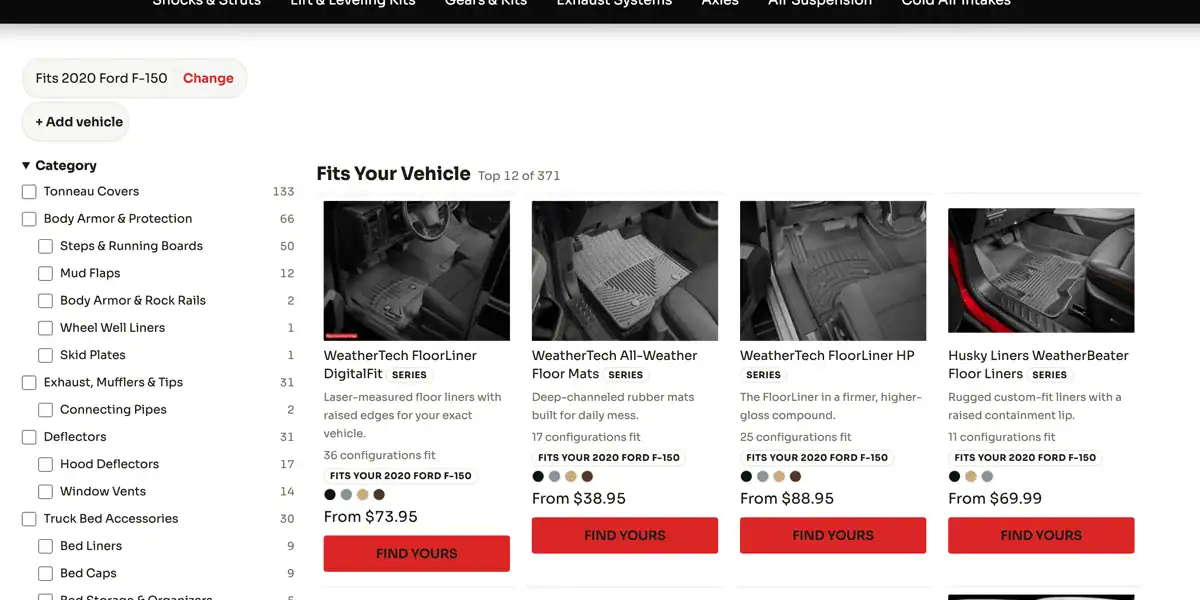
Run the same decode yourself in the demo at the top of this page. Pasting 1FTFW1E4XLFA10000 validates the check digit and decodes the VIN to a 2020 Ford F-150. In the demo environment that vehicle then becomes a chip reading Fits 2020 Ford F-150, with a Change link next to it and an option to add a second vehicle to the garage.

Storefront after a VIN decode showing a Fits 2020 Ford F-150 vehicle chip, category counts, and product cards badged Fits Your 2020 Ford F-150
After the decode: the vehicle chip, a filtered category tree, and per-product fitment badges.

What changes on the page once the vehicle is applied:

What to check when you run this against your own catalog: whether the sidebar counts change at all, and whether the fitment badge appears on products you already know fit.

Try a plate instead of a VIN and the same thing happens: the plate resolves to a VIN, the VIN decodes, and the catalog narrows. Change the ninth character of the sample VIN and submit it, and the check digit fails locally, so the store returns an error rather than guessing at a vehicle.

Observed in the PartsLogic demo environment in August 2026. Counts move as the catalog changes.

How VIN Lookup Gets Onto an eCommerce Platform

If you are comparing platforms rather than evaluating one, three patterns cover most of the market. Sorting a vendor into the right one tells you more than a feature checkbox does.

What separates them is rarely the decode itself, because most of them decode against the same free NHTSA vPIC data. It is what happens after the decode. Three questions are worth asking any vendor:

Read about headless and composable commerce with fitment data

Who VIN Lookup Is For

VIN entry earns its place on some catalogs and is decoration on others. The deciding factor is whether your shoppers know their vehicle well enough to pick it from a dropdown.

Catalogs where it pays off

Catalogs where it matters less

VIN Lookup Readiness Checklist

Work through this before turning VIN entry on. Most of it is catalog work, not platform work.

Fitment data

Storefront behavior

Entry methods

Measurement

Request a Demo

FAQs About VIN Lookup on an eCommerce Site


Yes. VIN lookup is live on Web Shop Manager stores through PartsLogic, the search and fitment product Web Shop Manager builds. A shopper pastes a VIN, the store validates the check digit and decodes it against the public NHTSA database, shows the vehicle back to the shopper, and applies it as fitment context across search, category browsing, and product pages. License plate entry sits in the same panel as a fallback, and the vehicle is saved to a garage that holds more than one vehicle.


Year, make, and model decode reliably, and that is what sets the vehicle on the store. Trim and series are frequently blank in the VIN, because most manufacturers do not encode them. Cab configuration, bed length, and axle ratio are usually absent too, and a VIN cannot see modifications made after the vehicle left the factory. So the VIN gets the shopper to the right truck fast, and the filters and the product page settle engine and configuration from there.


Yes. Plate and state entry sits alongside VIN entry in the same panel. A lookup service returns the VIN registered to that plate, that VIN is decoded, and the flow continues exactly as a typed VIN would. Plate lookup runs through a paid third-party provider, so it carries a per-lookup cost that decoding through the federal database does not, and coverage varies by state. Because a reissued or recently transferred plate can return a stale vehicle, the confirmation step matters more here than anywhere else.


Yes, and this is the part most VIN projects underestimate. Decoding produces a vehicle. Filtering a catalog by that vehicle requires ACES applications already attached to your products saying which vehicles each part fits. Without them, a decoded VIN has nothing to match and every shopper gets an empty result set. Applications should carry engine and configuration qualifiers as well, since that is where the shopper finishes narrowing after the VIN sets the vehicle.


Yes, on the same responsive vehicle panel, which stacks vertically on a phone. One thing it does not do today: there is no camera or barcode scan. The storefront asks the shopper to paste the 17 characters off the door jamb, and the check digit is validated locally so a transcription error is caught before anything is filtered. For a shopper who cannot find the VIN, plate and state entry can be the faster path on a phone.


Yes. VIN entry is an additional way into the vehicle selector a Web Shop Manager store already has, so it does not change how the rest of the storefront behaves. The work that decides the timeline sits on the catalog side: how complete your ACES applications are, and whether they carry engine and configuration qualifiers. Where the fitment data is already clean, the remaining work is storefront configuration. Where it is not, the fitment data is the project and VIN entry is the last step.

See VIN Lookup Running on Your Catalog

Bring a VIN and a part number. A demo runs them against your own catalog and shows what your fitment data does with them, including where it comes up short.