Aug 16, 2011 | 5 Min Read
How to Add a YouTube Video to Your Website (Step-by-Step Guide)
Get in touch with us
Reach out to us for any inquiries or support, and let’s connect!


Adding YouTube Video To Website for Commerce
As eCommerce website developers, we often get asked the question, “What can I do to make my website stand out from the competition?”. While there are many ways that we can suggest for our clients to proceed in differentiating themselves, we often suggest that they add videos to their product pages because of its effectiveness and relative ease. However, we find that this advice rarely gets acted upon! My assumption is that many people think that adding a video to their product page is something very technical that they would not be able to do. Well, my goal of this blog post is to have you posting videos in your sleep.
What Can Product Videos Do For My eCommerce Sales?
Before I proceed with the explanation of HOW to add videos, I think I need to start with the WHY. Here at Web Shop Manager, we know that product videos will help your sales because we have seen it work for many of our clients and friends. But here are some cold hard facts if you don’t believe us…
-
Customers that viewed a video on a product page are 85% more likely to buy
-
YouTube is second to Google as the largest Search Engine. Two million video’s are viewed per day
-
eCommerce giant Zappos reported a 6%-30% sales increase on products where videos were added

Obtaining Videos for Your eCommerce Website
Now that you are officially convinced of the potential power of adding videos to your site, your next question is “Where do I get these videos?” There are a couple ways that you can precede, but the most important step is to set up your own YouTube channel so that you can organize your videos (both borrowed and original). To set this up, please visit this YouTube page.
The next step really depends on what types of products you sell. If you feature products from a manufacturer that already has videos created, then most of the work is done for you! Simply search YouTube for the product videos and add them to your Playlist by clicking the +Playlist button under the video (you must be logged in to do this).
Learn more about adding Playlists and Videos to your Playlist. You will want to avoid using videos that are created by competitors because it may direct traffic to their site (not what you want). I would suggest using manufacture’s videos or creating videos yourself.
This is the other option for adding videos to your YouTube playlist: creating and upload videos yourself. This avenue is much more time consuming, but it holds a lot of SEO value for both your product pages and your YouTube account. If you sell your own unique products or the manufacturers of your products do not supply videos via YouTube, this is the way that you will have to go. There are many inexpensive HD video recorders that come complete with software, such as the Flip video camera, that you can use to simply shoot and upload to your YouTube account with no editing required (a couple takes may be necessary).
How To Add Videos To Website
However you choose to acquire videos to your YouTube account is up to you, but regardless the next steps is so easy you will wonder why you waited so long to add a video to your product page. Here is the step by steps to embedding a video on your WSM product page…
- Find the video that you want to embed from your channel , click Share, then embed
- Copy the code that was created for you. It will look something like this…
iframe src=”http://www.youtube.com/embed/Yn99OnNhGfw” frameborder=”0″ width=”560″ height=”349″>iframe - Log into WSM and navigate to Catalog > Products. Search and find the product that you have a video for
- Edit your product and scroll down the Extra Details section of the page
- In the Title field type in ‘Videos’ in the Description field paste the code that you copied from YouTube
- Click Save Changes!
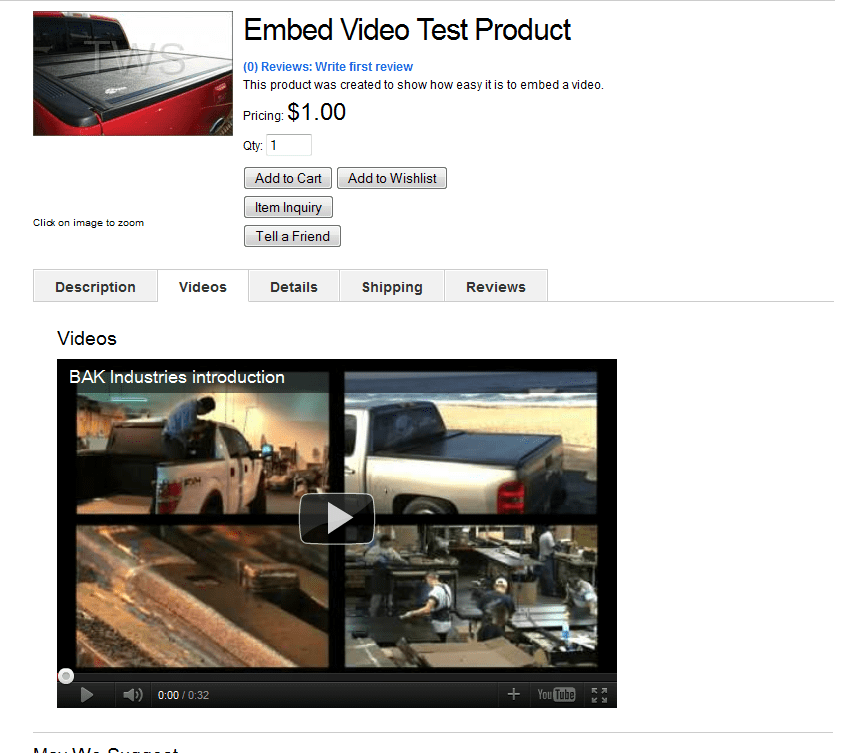
You can now view your product on the front end of your site and see your Videos tab added. Here a customer can watch a video on that specific product without navigating away from your site!
Since metrics are so important in eCommerce, I would highly suggest testing videos on a few of your most popular products and monitoring the effect that adding a video has had. Once you have confirmed that videos have positively affected your product’s sales, then continue with adding videos to more and more products.
If you have any questions on adding videos to your products pages, please submit a Support Request and someone from our Customer Experience team will gladly provide more direction on this topic.



More On Related Topic
Explore our highlighted blogs for the latest insights and trends in the industry.
Develop a Winning Coupon Strategy: Essential Tips for Success
Web shop Manager - eCommerce Coupon StrategyConsumers on the huntAs the technological age has allowed the consumer to become better informed about products prior to purchase, it has also afforded them the opportunity to...
Ecommerce CRO Series Part 5: Category & Section Page Conversion Boosters
5 Ways to Increase Your Ecommerce Conversion Rates on Your Category PagesNow that you have your product pages optimized for conversion, we’re going to take a step back and optimize your category or ‘section’ pages.In...
Simplify Your eCommerce Data: 3 Complex Problems Solved
How to Simplify 3 Complex eCommerce Data ProblemsThere is A LOT of data out there – and it doesn’t all fit in the same category. In can be downright overwhelming and make us want...

Ready To Grow Your Business?
Ready to elevate your aftermarket eCommerce presence and conversions—across auto, truck, powersports, marine, and more? Connect with
Web Shop Manager for tailored solutions: strategy, platform, and performance in one team.