Search Engine Optimization How To | Web Shop Manager
Last week we covered basic definitions that you will encounter often in the world of SEO. Now that we have a basic understanding about search engine optimization, keywords, and their role in SEO (which you can review in [Part 1: Definitions and Fundamentals]), we can move on to actual keyword research.
Search Engine Optimization How To: What is keyword research?
The process for conducting effective keyword research has fundamentally shifted from relying on a single tool to using a multi-faceted approach focused on user intent and competitive gaps. The days of simply plugging a keyword into a planner and sorting by search volume are over.
Shifting Focus: From Volume to Intent & Difficulty
Modern keyword research begins with understanding the competitive landscape and the user’s intent, not just the raw search volume.
Keyword Difficulty (KD) – Instead of focusing only on high search volume (which often leads to competition with giants like Amazon or eBay), prioritize keywords with low to moderate Keyword Difficulty (KD) scores. KD measures how hard it is to rank on the first page of Google for that query.
Search Intent Alignment – Every keyword must be mapped to one of the four key types of Search Intent (Informational, Navigational, Commercial, or Transactional). Your content cannot rank unless it perfectly aligns with the user’s primary goal.
SERP Features – Analyze the Search Engine Results Page (SERP) for features like Rich Snippets, People Also Ask (PAA) boxes, and Featured Snippets. Targeting these features is key to gaining immediate visibility even without a number one organic rank.
Modern Tool Ecosystem (Tool Diversity)
While the Google Keyword Planner remains useful, modern SEO relies on specialized platforms to gain a complete competitive picture:
Tool Category
Recommended Tools
Primary Use for Automotive eCommerce
Competitive Analysis
Ahrefs, SEMrush, Moz
Finding Keyword Gaps: Identify keywords where your top competitors are ranking but you are not.
First-Party Data
Google Search Console (GSC)
Optimizing Existing Content: See exactly what queries users are already using to find your site and how your existing pages are performing.
Strategy: Building Topic Clusters and Answering Questions
Modern keyword strategy is shifting from single keywords to Topic Clusters, where you cover a broad “pillar” topic (e.g., “Ford F-150 Suspension Kits”) and link out to several supporting “cluster” articles that answer specific questions.
Identifying Long-Tail and Content Gaps
Long-tail keywords are no longer defined purely by low search volume; they are found by digging into specific, complex user questions that your competitors haven’t answered fully.
Use Google’s PAA Box: Analyze the “People Also Ask” section of the SERP for your main keywords. Each PAA question is a highly relevant, unanswered long-tail keyword idea.
Focus on Specificity: Create content that answers complex, niche questions for your automotive audience.
Old Long-Tail: “Mustang brake pads” (too broad)
New Long-Tail: “What is the installation time for Performance brake pads on a 2015 Mustang GT?” (specific, high-intent question).
Analyze Competitor Content: If a competitor has weak, short, or outdated content for a relevant topic, that signals a prime keyword gap for you to exploit with a comprehensive, E-E-A-T-driven article.
Modern SEO Practices: Leveraging Google Search Console (GSC)
The Google Keyword Planner, while useful for basic search volume and PPC, is obsolete for modern organic SEO strategy. Instead, SEO professionals rely on Google Search Console (GSC), a free tool that provides first-party data directly from Google on how your site is performing in search results right now.
GSC is crucial for an automotive eCommerce platform because it focuses on your actual customers and content, not just generalized keyword data.
🎯 GSC for Organic Keyword Research and Optimization
Instead of predicting future search volume, GSC shows you the current state of your site’s SEO performance:
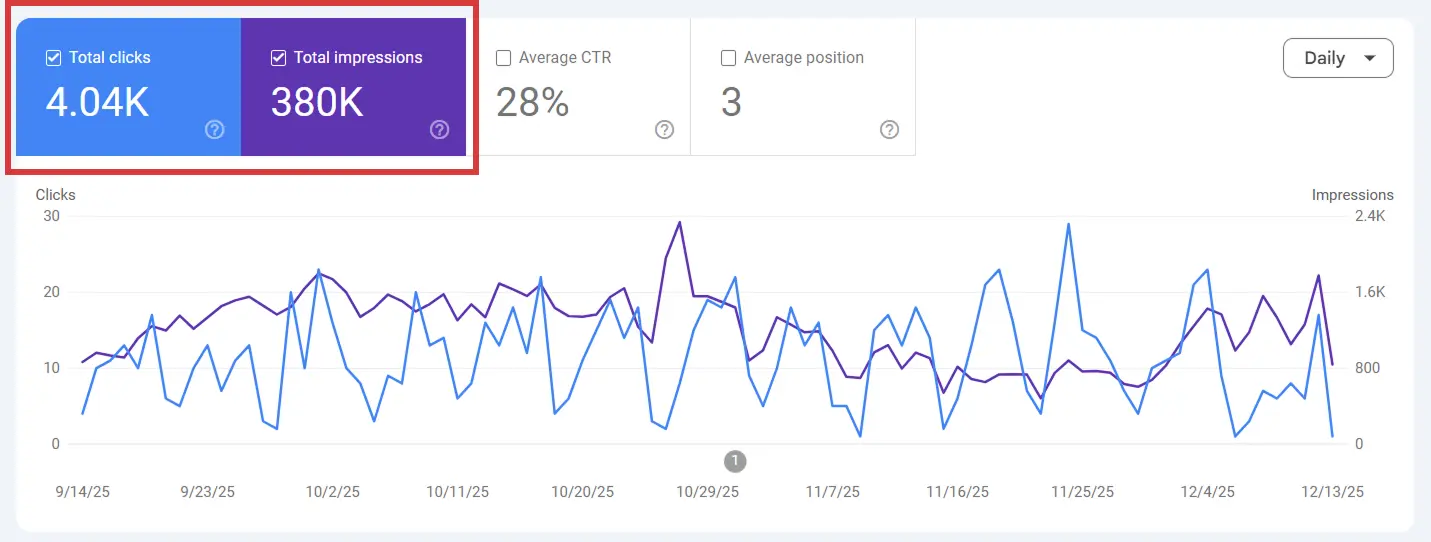
Real-World Query Data: GSC’s Performance Report shows the exact long-tail queries users typed into Google that led to your site being displayed (Impressions) or clicked (Clicks). This is a goldmine for understanding actual customer search behavior.
Identify Ranking Opportunities: Focus on queries where your pages have a high number of Impressions but a low Click-Through Rate (CTR) (e.g., pages ranking position 11–20). These pages are “on the verge” of the first page and are ideal candidates for optimization (better Meta Title/Description, internal linking).
Measure Page Experience: GSC now includes direct reporting on Core Web Vitals performance, which measures speed, interactivity, and stability. Monitoring this ensures your pages meet the technical bar required for ranking.
Technical Health: GSC identifies critical errors such as mobile usability issues, indexing problems (e.g., pages not being found by Google), and structured data issues (Schema Markup errors).
Actionable GSC Strategy for Automotive Sites
Use GSC to find profitable keyword content gaps in your specialized parts catalog:
Filter by Product Type: Use the Performance Report to filter queries by your key product categories (e.g., “suspension,” “brake pads,” “F-150”).
Find the “Gold Nuggets”: Look for specific, highly detailed queries (long-tail) that have high impressions but zero clicks. These indicate a strong user need that you are currently missing in your title, description, or content.
Optimize Existing Content: For pages with low CTR, rewrite the Meta Title to be more compelling and the Meta Description to include the specific keyword, increasing the chances of the user clicking the link when they see it in the SERP.
Step-by-Step: Capturing Quick Wins with GSC
The most effective use of GSC is identifying “low-hanging fruit” keywords—queries where your site already ranks on page two or three (positions 11-30) and needs only minor optimization to vault onto page one. This strategy delivers the quickest traffic gains with the least effort.
Follow these steps to find and prioritize these easy ranking opportunities for your automotive parts:
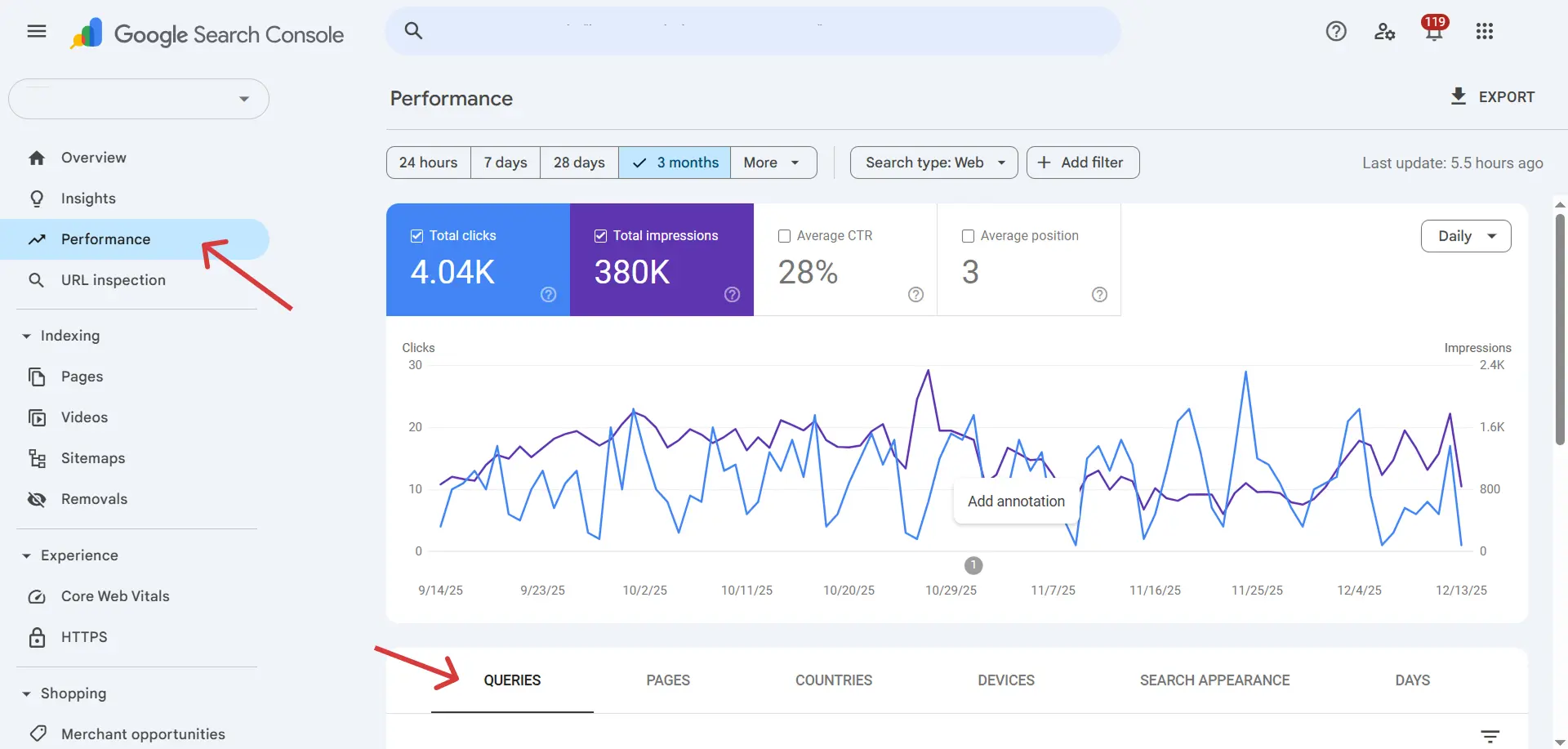
Access the Performance Report & Filter by Position
Navigate to the Performance Report in Google Search Console and ensure the Average Position metric is selected.
Click the Queries tab to view your ranking keywords.
Apply a filter: Select Position, choose Greater than, and enter 10 (to filter out all first-page rankings).
Optional but recommended: Set a second filter: Position, choose Less than, and enter 30 (to focus on the most realistic targets).
Identify High-Opportunity Keywords (The “Low-Hanging Fruit”)
With the results filtered, you are looking for keywords that demonstrate high user interest but low click-through
Sort the table by Impressions (Descending): This brings queries with the highest search volume to the top.
Look for High Impressions / Low Clicks: Your target keywords will be highly relevant queries (e.g., “stainless steel cat-back exhaust for F-150”) with many Impressions but a low number of Clicks.
Prioritize and Plan Optimization
Prioritize a list of 10-20 high-opportunity keywords that are specific to your products and vehicle applications.
Check Intent: Verify the keyword’s intent is Commercial or Transactional. For instance, “best Tacoma suspension kit reviews” is commercial and valuable.
Map the Page: Note which specific page on your site is ranking for this keyword (found in the Pages tab after filtering by the query).
Execute On-Page Optimization for Clicks (CTR)
Once you have the keyword and the target page, focus on immediate on-page fixes that increase the click rate and relevance.
Update Meta Title: Rewrite the Title to be more compelling and include the exact target low-hanging keyword (e.g., changing “Ford F-150 Exhaust” to “Best F-150 Cat-Back Exhaust Kits – Free Shipping”).
Update Meta Description: Use the description to fully address the user’s intent
Advanced Strategy: Targeting Competitors & User Intent
Moving beyond your own site data (GSC), the most powerful way to uncover high-value keywords and content ideas is by systematically analyzing your SEO competitors. This approach helps you fill the gaps your competitors are already profiting from.
Competitor Keyword & Content Gap Analysis
Use third-party tools (Ahrefs, SEMrush, SpyFu) to compare your domain against 5-10 direct automotive competitors to find actionable content gaps:
Competitor Keyword Analysis: Analyze a competitor’s top-performing pages to quickly identify valuable keywords they are ranking for. This helps you see where they are winning and often reveals terms you didn’t know to target, such as specific part numbers or regional terms.
Content Gap Analysis: Define and explain how to find keywords for which your competitors have content, but your site does not. You should prioritize keywords that multiple competitors rank for, but you are completely missing. Filling these domain-level gaps is crucial for comprehensive topic coverage.
The Intent-Keyword Match: Content Format is King
The final and most important “how-to” step is ensuring your page format perfectly satisfies the user’s intent. Google already knows the intent and rewards content that matches the search results.
The type of content you create must align with the keyword modifier the customer uses.
Keyword Modifier (Intent)
Content Type to Create
Automotive Example & Goal
“Best,” “Review,” “Vs.” (Commercial)
Comparison Page or Buying Guide
Page comparing “Best F-150 Lift Kits 2024” to guide the user toward a purchase decision.
“How to,” “Guide,” “Why” (Informational)
Detailed Blog Post or Tutorial
Article answering “How to choose the right turbocharger for your engine”.
“Buy,” “Price,” “Discount” (Transactional)
Product Page or Category Page
Fast-loading page for “Buy Mishimoto Radiator for WRX”.
By creating the expected page type, you enhance UX, lower bounce rates, and increase your chances of ranking.
The foundation of successful automotive eCommerce no longer rests solely on simple meta tags; it’s built on a deep understanding of user intent and content quality (E-E-A-T). By focusing on highly specific long-tail keywords and strategically leveraging Google Search Console (GSC) to capture quick wins, you can identify and close the content gaps that competitors leave open.
Implementing a strategy that consistently matches the searcher’s goal with the right content format is key to driving high-converting traffic and securing your position as an authoritative leader in the performance auto parts industry.
Dana Nevins
Founder and CEO of Web Shop Manager
Dana Nevins is the CEO of Web Shop Manager, bringing over 25 years of dedicated experience in the automotive aftermarket and digital retail sector. As a recognized leader, he specializes in simplifying complex enterprise challenges, including ACES/PIES compliance and scalable B2B/B2C solutions, helping retailers turn high-volume data into competitive advantage.
Explore our highlighted blogs for the latest insights and trends in the industry.
Blogs
Improve Sales Online: Best E-commerce Store Software
How to Improve Sales Online with Best Online Auto Store SoftwareWith the explosion of Ecommerce over the past decade, a growing number of people are joining the online revolution to take advantage of the...
Product pricing is critical for your ROI, but it's also essential for your brand. If you offer too many big deals, and you come across as a bargain brand, not enough, and your customers...
10 Essential SEO Tips for Ecommerce Websites to Boost Sales
10 SEO Tips for eCommerceIf you want to establish a presence for your ecommerce website on the internet, it needs to get found on search engines for the products you sell. This can be...
Ready to elevate your aftermarket eCommerce presence and conversions—across auto, truck, powersports, marine, and more? Connect with Web Shop Manager for tailored solutions: strategy, platform, and performance in one team.